Monday, June 9, 2008

Very slow SSH logging in

If logging in to SSH is sooooo sloooooow.

From http://ubuntuforums.org/showthread.php?t=422907
- Type
vi /etc/ssh/sshd_config

- Add this line into that file, and then save, and exit
UseDNS no

- Type
service sshd restart

Sunday, June 8, 2008

Auto-Block SSH Intruder on Fedora7

From เมื่อถูก Brute-Force Attack ที่ sshd

Log in as root and type:
chmod 604 /var/log/secure
yum -y install denyhosts
service denyhosts start
chkconfig denyhosts on

Then DenyHosts will do its job. No need for maintenance.

You can view the blocked IP at:
/etc/hosts.deny


Activity log file is here:
/var/log/secure


The configuration of denyhosts is here:
/etc/denyhosts.conf

Saturday, May 31, 2008

MP3 Auto-Volume Level

I have found this useful software MP3Gain
It can adjust the volume level of MP3 files, without losing quality or embedded tag (artist, art work, lyric).

To use the MP3Gain:
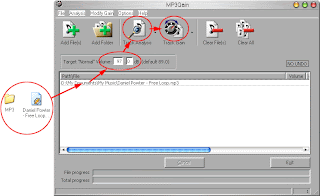
1. Drag MP3 file(s) or folder, and drop into MP3Gain window.
2. Edit Target “Normal” Value to 97.0
(It equals to -12.5 dB in Sony SoundForge.)
3. Click on Track Analysis button. MP3Gain will calculate how much dB will be increased or decreased.
4. Click on Track Gain button to apply the calculated dB.
Finished…

The MP3Gain developer also builds AACGain too, which can adjust the volume level of AAC files.
It also available for Linux and Mac users.

MP3 Auto-Volume Level

http://203.185.67.122/toy/blog/?p=161&langswitch_lang=en